
UltraVPN Review 2026: Is It Worth Your Money, or Are There Better Options?
An in-depth look at speed, security, privacy, streaming, features, pricing, and the limitations you should know before subscribing.
A VPN is supposed to make your online life simpler. You install it, connect to a server, and get on with your day. Your connection is encrypted, your public IP address is masked, and you can browse with an additional layer of privacy without constantly adjusting settings.
UltraVPN promises exactly that kind of experience.
It combines a straightforward interface with encrypted connections, international server locations, streaming support, and additional tools such as a password manager and dark web monitoring. It also advertises unlimited bandwidth and support for up to 10 simultaneous connections, making it appealing to individuals who want to protect several devices without managing complicated configurations.
At first glance, the package looks convincing. The introductory price can be attractive, the feature list covers most everyday requirements, and the apps are designed for people who do not want to become networking experts just to use a VPN.
But a longer look raises some important questions.
How consistently does UltraVPN maintain its speed? Can it protect your real IP address in every situation? Does its privacy policy provide enough reassurance? And does the introductory price still look attractive once the renewal bill arrives?
These are the questions that matter more than a long list of advertised features.
This review examines UltraVPN from the perspective of an ordinary user: someone who wants a dependable connection, reasonable performance, useful security features, and a subscription that delivers value beyond the first year.
UltraVPN at a Glance
| Feature | Details |
|---|---|
| Service | Consumer VPN |
| Encryption | AES-256 advertised |
| Proprietary protocol | Hydra |
| Other protocols | Availability varies by platform and app version |
| Advertised server network | 1,300+ servers |
| Advertised location coverage | 125+ locations |
| Simultaneous connections | Up to 10 |
| Kill switch | Available |
| Split tunneling | Available, with platform-dependent controls |
| Password manager | PassWatch |
| Dark web monitoring | Included feature |
| Bandwidth limits | Unlimited on advertised paid plans |
| Supported platforms | Windows, macOS, Android, iOS |
| Customer support | Advertised 24/7 assistance |
| Money-back guarantee | Advertised 30 days, subject to terms |
| Independent privacy audit | No publicly verified audit identified in the reviewed material |
| Overall verdict | Convenient for everyday use, but not without concerns |
Feature availability, pricing, and platform support can change. Confirm the current details before subscribing.
1. What Is UltraVPN, and Who Is It For?
UltraVPN is a consumer virtual private network service designed to encrypt internet traffic and conceal a user’s public IP address from the websites and services they visit.
Instead of connecting directly to a website, your device establishes an encrypted connection to a VPN server. That server then forwards your traffic to its destination. Websites generally see the server’s public IP address rather than your original one.
This arrangement can improve privacy on public Wi-Fi, reduce the visibility your internet provider has into your browsing traffic, and help you access services that are available in other regions.
UltraVPN’s main selling point is simplicity. Its apps focus on connecting to a location, managing the connection, and accessing essential settings without overwhelming users with technical options.
That approach makes sense for beginners. Most people do not want to spend their evenings learning about tunnelling protocols, routing tables, or DNS configuration. They want something that works without requiring constant attention.
UltraVPN also offers features beyond basic VPN protection. PassWatch Password Manager is intended to help users store their login credentials, while Dark Web Scan provides alerts when monitored personal information appears in known data associated with breaches.
These additions can make the subscription more useful, but they should not distract from the central question: how dependable is the VPN itself?
A password manager cannot compensate for a weak VPN connection. Dark web monitoring cannot guarantee that personal information will remain private. And a long server list means little if the service struggles to maintain stable performance.
UltraVPN is best suited to users who value simplicity and essential privacy features. Whether it is suitable for more demanding users depends on its performance, privacy assurances, and long-term cost.
2. Features That Matter in Everyday Use
A VPN feature is only valuable when it solves a real problem. UltraVPN includes several familiar protections, along with a few additional tools. The important distinction is between features that improve everyday usability and claims that still require independent verification.
AES-256 Encryption: The Foundation of the Connection
UltraVPN advertises AES-256 encryption to protect data transmitted through its VPN tunnel.
When configured correctly, encryption helps prevent other people on the same network from reading the contents of your traffic. This is particularly relevant when using public Wi-Fi at airports, hotels, cafés, and other shared locations.
AES-256 is an established encryption standard, but it is not unique to UltraVPN. Most reputable VPN services use strong encryption as a basic requirement.
The quality of the overall implementation matters just as much. A VPN can use strong encryption and still have problems involving IP leaks, DNS handling, application security, or connection interruptions.
The practical benefit is straightforward: UltraVPN can add a layer of protection to your internet connection, but the encryption specification alone does not prove that the entire service is secure.
Hydra Protocol: Built for Performance
UltraVPN uses its proprietary Hydra protocol, which is designed to improve connection performance and stability.
The provider promotes Hydra as a way to maintain strong speeds, including under conditions where ordinary VPN connections may struggle. The protocol is associated with technology used by other consumer security products, but that association should not be interpreted as independent proof of UltraVPN’s real-world performance.
In practice, speeds depend on several factors: server distance, congestion, network routing, the user’s original connection, and the device being used.
A protocol may perform well in one environment and less impressively in another. That is why independent speed measurements matter more than headline claims.
UltraVPN has also offered alternative protocols, although the available choices vary by platform and software version. Users who specifically require a particular protocol should verify that it is supported by the current app.
The takeaway: Hydra is an important part of UltraVPN’s technical offering, but the results you get matter more than the name of the protocol.
A Kill Switch That Helps Prevent Accidental Exposure
VPN connections can occasionally disconnect. If your device immediately resumes using its ordinary internet connection, your real IP address may become visible.
A kill switch is designed to prevent that by blocking internet traffic when the VPN connection drops.
UltraVPN offers this protection, although the available controls can vary between desktop and mobile platforms. Some mobile configurations rely on operating-system settings rather than a dedicated in-app control.
This feature is particularly important for people who leave a VPN running in the background throughout the day.
However, having a kill switch is not the same as proving that every connection is leak-free. Users who rely on the VPN for sensitive activity should confirm that the feature is enabled and check how the app behaves after a forced disconnection.
Split Tunneling: Useful, but Not for Every Situation
Split tunneling lets you decide which traffic travels through the VPN and which traffic connects directly to the internet.
This can be helpful when a particular service does not work properly through a VPN or when you want certain applications to retain access to your local network.
The feature can also reduce unnecessary routing for traffic that does not need to use the encrypted tunnel.
The trade-off is important: anything excluded from the VPN does not receive the protection of that tunnel.
UltraVPN offers split-tunneling functionality, but the controls and supported traffic types may vary by app. Check the available settings before relying on it for a particular application.
PassWatch Password Manager: A Useful Extra
Password reuse remains a common account-security problem. If one website suffers a breach and the same password is used elsewhere, multiple accounts can become vulnerable.
A password manager helps address this problem by storing credentials in a central location and making it easier to use different passwords for different accounts.
UltraVPN includes PassWatch as part of its offering. This can add value for users who do not already have a password manager.
Before moving all your credentials into it, check its current support for your devices, synchronization, account recovery, and additional authentication protections.
A password manager is only as useful as its security model and the habits of the person using it. Strong, unique passwords and multifactor authentication remain important.
Dark Web Scan: Awareness, Not a Guarantee
UltraVPN’s Dark Web Scan is intended to notify users when monitored personal information is detected in data associated with known breaches or dark web sources.
An alert can provide a useful warning that an email address or other information may have been exposed.
It does not necessarily mean that someone is actively misusing your details. Equally, receiving no alert does not prove that your information has never been compromised.
If your details appear in a breach, change the affected password, update any accounts using the same credentials, and enable multifactor authentication wherever possible.
The feature is useful as an additional monitoring tool, but it should not be mistaken for comprehensive identity-theft protection.
Malware and Phishing Protection
UltraVPN advertises additional protection against malicious websites, phishing attempts, and certain forms of online tracking.
These features may help block known threats before a user interacts with them. Their effectiveness depends on the protection technology, threat databases, and categories of threats covered.
They do not make the VPN a substitute for every other security measure. Suspicious downloads, infected applications, fraudulent messages, and social-engineering attacks can still pose risks.
Keep your operating system updated, avoid opening unexpected attachments, and use appropriate security software for your devices.
Unlimited Bandwidth
UltraVPN advertises unlimited data on its paid plans, allowing users to browse, stream, and download without a fixed monthly data allowance.
That is useful for people who regularly watch videos or transfer large files.
However, unlimited data does not mean unlimited speed. Your connection can still slow down because of server congestion, long-distance routing, or limitations in your original internet service.
The absence of a data cap is a practical benefit, but the speed available to you remains the more important factor.
3. UltraVPN Speed Test: Fast Enough for Daily Use?
Speed is where a VPN moves from looking good on paper to proving its value in practice.
Every VPN introduces another stage into the connection process. Your traffic must travel through an encrypted tunnel and reach a VPN server before continuing to its destination. A well-optimized service can keep the resulting slowdown relatively small. A less consistent one can make everyday browsing noticeably slower.
UltraVPN’s results have varied across independent tests.
A published vpnMentor review reported an approximately 21% speed reduction on nearby servers and around 61% on distant ones. Security.org reported larger reductions in its own testing, with download and upload speeds falling by roughly 60%.
These figures should not be combined into a single definitive score. Different testing locations, internet connections, server loads, and measurement methods can produce different results.
Nevertheless, the variation points to an important consideration: UltraVPN does not deliver the same performance in every situation.
Nearby Servers: The Better Starting Point
A nearby server generally provides the best chance of maintaining a responsive connection.
Shorter physical distances usually mean lower latency and less opportunity for routing delays. When the server is not congested, UltraVPN may be perfectly usable for web browsing, video calls, standard streaming, and routine downloads.
The difference becomes more noticeable for users with slower internet connections. Losing a portion of an already limited connection can affect page loading, video quality, and download times.
Choosing a nearby server is therefore the sensible first step.
Long-Distance Servers: Where Performance Can Fall
Connecting to a distant country introduces more variables.
Data must travel farther, routing may be less efficient, and the selected server may have different capacity from a nearby alternative. Virtual server locations can further complicate the relationship between the country displayed in the app and the physical route your traffic takes.
Third-party testing has reported substantial slowdowns on some distant UltraVPN connections.
For someone checking email or reading websites, this may be manageable. For a large download or high-resolution stream, the difference can be more frustrating.
A connection that performs well in one country should not be assumed to perform equally well everywhere else.
Gaming: Stable Ping Matters More Than Marketing
Online games are sensitive to latency, packet loss, and connection stability.
UltraVPN has been reported to work reasonably well for gaming on nearby servers under suitable conditions. That does not mean it will improve every gaming connection.
If your normal connection already has low latency, routing through a VPN server may add unnecessary delay. If your original route is inefficient, a VPN may occasionally provide a better route, but that outcome is not guaranteed.
For competitive gaming, test the specific game and region you use. A high download-speed figure cannot compensate for unstable ping.
Can UltraVPN Handle 4K Streaming?
Potentially, yes, provided your connection remains fast enough and the streaming service works through the selected server.
The problem is consistency. A fast broadband connection may remain suitable for high-resolution video even after a significant speed reduction. A slower connection may struggle under the same conditions.
Users who stream occasionally may find UltraVPN adequate. Those who rely on consistent 4K playback or frequently switch between international libraries should test their actual requirements before committing.
Speed verdict: UltraVPN can be fast enough for everyday use, particularly on nearby servers, but its variable performance makes it difficult to recommend to users who need consistently high speeds worldwide.
4. Streaming Performance: Does UltraVPN Unblock Popular Services?
Streaming support is one of the most attractive reasons to use a VPN. It can help users access region-specific content when travelling or when a service makes different libraries available in different countries.
UltraVPN has demonstrated the ability to access selected streaming services in third-party testing. However, results have differed by platform, server, and region.
Reported successful tests include Netflix, Hulu, Max, Peacock, and DAZN in particular locations. Other tests have encountered difficulties with Disney+, Amazon Prime Video, BBC iPlayer, and certain regional Netflix libraries.
These results are not necessarily contradictory. Streaming platforms routinely update their VPN detection systems, and the same VPN server may work at one time and fail at another.
| Service | Reported experience |
|---|---|
| Netflix | Access reported for selected regional libraries |
| Hulu | Successful access reported in testing |
| Max | Successful access reported in testing |
| Peacock | Successful access reported in testing |
| DAZN | Successful access reported in testing |
| Disney+ | Access has been inconsistent in reported tests |
| Amazon Prime Video | Access has been inconsistent in reported tests |
| BBC iPlayer | Results vary by server and test environment |
These are reported test experiences, not guarantees of current compatibility.
Netflix and Regional Libraries
UltraVPN has been reported to access Netflix in several regions, but access to one country’s library does not prove that every other library will work.
If a service detects the VPN, changing locations may help. However, there is no guarantee that another server will provide access.
Streaming Quality and Buffering
Unblocking a service is only half the job. The connection must also maintain sufficient speed for the selected video quality.
UltraVPN may deliver a smooth experience when connected to a suitable server. If speeds drop significantly, users may encounter longer loading times, reduced resolution, or buffering.
For occasional streaming, that trade-off may be acceptable. For frequent international streaming, dependable access and consistent performance should carry more weight than the number of supported platforms advertised.
Streaming verdict: UltraVPN is capable of accessing selected services, but it is not a dependable all-platform solution based on the reported evidence.
5. Server Network: More Locations Do Not Always Mean Better Coverage
UltraVPN advertises more than 1,300 servers across over 125 locations. That sounds extensive, but server numbers need context.
A large network can improve the chances of finding a nearby connection and reduce congestion when capacity is distributed effectively. However, the total number of servers alone does not reveal how many are available in each country, how much traffic they can handle, or how consistently they perform.
UltraVPN’s network includes a combination of physical and virtual server locations, according to third-party reports.
A virtual location allows a VPN to offer an IP address associated with a particular country while the underlying hardware may be physically located elsewhere. This can extend geographic coverage without placing physical servers in every advertised country.
The downside is that the actual network route may be less intuitive than the location shown in the app. Depending on the physical server and routing arrangement, this can affect latency and speed.
UltraVPN also offers fewer specialized connection options than services with dedicated streaming, gaming, or P2P server categories.
For ordinary browsing, that may not matter. For users who want detailed control over their connection, the lack of specialized options is a limitation.
The important question is not simply how many locations exist. It is whether the network provides reliable performance in the places you actually need.
6. Privacy and Logging: What Does UltraVPN Collect?
A VPN can encrypt your traffic, but using one also means placing some trust in the provider operating the servers.
UltraVPN states that it does not retain identifiable records of users’ VPN browsing activity. However, its privacy notice describes certain operational data collection, including information used for connection management, service analytics, and technical support.
These distinctions deserve attention.
What Its No-Logs Policy Means
A no-logs policy does not necessarily mean that a provider collects no information whatsoever.
A service may need limited operational data to establish connections, troubleshoot problems, manage accounts, or maintain its infrastructure. The critical issue is whether that information can be associated with an identifiable user and their browsing activity.
UltraVPN’s published privacy notice explains its approach to session IP handling and other operational information. Users should read the current notice to understand what is collected, how it is used, and how long it is retained.
A company’s own privacy statement is important, but it is not the same as independent verification.
The Missing Independent Audit
No publicly verified independent audit of UltraVPN’s no-logs policy and server infrastructure was identified in the material reviewed for this article.
An independent audit can examine whether a provider’s stated privacy practices match its actual systems and procedures. Although an audit cannot guarantee that a service will never experience a vulnerability, it provides stronger evidence than a policy statement alone.
Without such verification, users must place greater reliance on the provider’s own assurances.
For casual browsing, that may be an acceptable trade-off. For people handling confidential work, sensitive research, or other high-risk information, independent verification should be a more important part of the decision.
The Reported IP Leak
A published vpnMentor review reported an IP leak while connected to an UltraVPN server. The reviewer stated that the issue occurred during one test and did not recur after the browser cache was cleared.
This report does not prove that UltraVPN leaks every user’s IP address or that the issue remains present in current versions. It does, however, raise a legitimate question about how the service behaves under certain conditions.
An IP leak matters because it can expose information that a VPN is intended to conceal. Users should not assume that encryption alone prevents every form of exposure.
Testing for IP, DNS, and WebRTC leaks can help identify problems, although no single test can establish that a VPN is secure in every situation.
Does a VPN Make You Anonymous?
No VPN can guarantee complete anonymity.
A VPN can conceal your original IP address from websites and encrypt traffic between your device and the VPN server. However, websites may still identify you through account logins, cookies, browser fingerprinting, or information you provide directly.
Your internet provider may also see that you are connected to a VPN, even if it cannot directly inspect the contents of properly encrypted traffic.
A VPN is one layer of privacy protection, not a replacement for careful online behaviour.
Privacy verdict: UltraVPN offers standard VPN protections and publishes a no-logs policy, but the lack of publicly verified independent auditing and the reported IP leak warrant caution for users with demanding privacy requirements.
7. Security Features: Protection Without False Promises
UltraVPN’s security package includes several features intended to reduce common online risks.
AES-256 encryption protects traffic inside the VPN tunnel. The kill switch is designed to block traffic when the connection drops. DNS leak protection is intended to prevent DNS requests from escaping through an unprotected connection.
These are useful safeguards, but they should be viewed as parts of a larger security system.
A VPN does not automatically protect against every malicious file, fraudulent email, compromised account, or unsafe download. Even a well-configured VPN cannot prevent someone from voluntarily entering their password on a fraudulent website.
Users should also keep their devices updated, enable multifactor authentication for important accounts, and use appropriate endpoint security.
UltraVPN’s advertised malware and phishing protection may provide an additional layer of defence, but its precise coverage should be checked against the current plan documentation.
The same applies to obfuscation and specialised features. Older descriptions of UltraVPN mention different protocol combinations and advanced settings, but product capabilities can change between releases. It is better to verify current functionality than rely on outdated feature lists.
The most useful approach is to evaluate what the app actually offers on your device, then test the safeguards you intend to rely on.
8. Apps and User Experience: Simple, but Not Especially Advanced
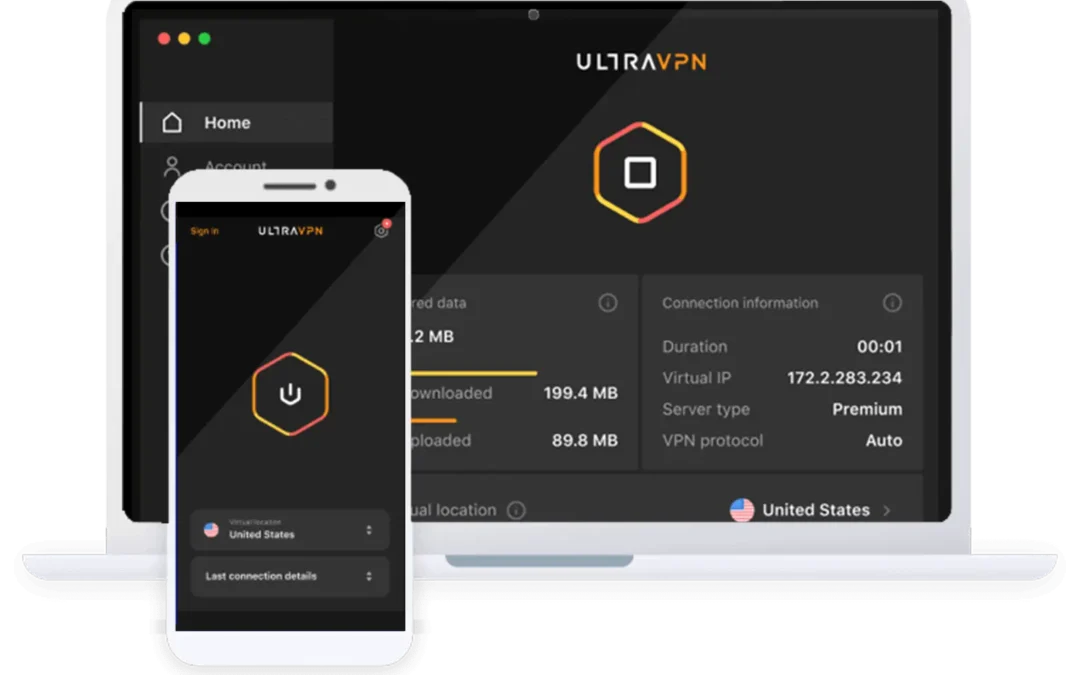
UltraVPN’s interface is designed to keep the main task straightforward: choose a location and connect.
That simplicity is a genuine advantage for beginners. There is little need to understand networking terminology before getting started, and the core connection process is easy to follow.
The desktop and mobile apps generally focus on connection status, location selection, and settings for available features.
Windows and macOS
The desktop apps provide the essential controls expected from a consumer VPN, including server selection and access to supported security settings.
However, users who want extensive configuration options may find the experience restrictive. Features such as advanced DNS configuration, detailed routing controls, and sophisticated multi-hop arrangements are not a strong part of UltraVPN’s offering.
Android and iOS
The mobile apps provide a similar streamlined experience. They are intended to make it easy to establish a VPN connection while using mobile data or public Wi-Fi.
Some controls differ between operating systems. Android users, in particular, may need to configure system-level settings to achieve the desired always-on protection.
This is not necessarily a security weakness, but it can make the setup less intuitive for people who expect every control to be available directly in the app.
What About Linux, Routers, and Smart TVs?
UltraVPN’s commonly documented native app support focuses on Windows, macOS, Android, and iOS.
Users who require Linux support, router-level VPN configuration, smart-TV apps, or browser extensions should confirm current availability before purchasing.
This is a meaningful limitation for households with many different devices. Ten simultaneous connections are helpful only if those devices can actually connect using a supported method.
Usability verdict: UltraVPN is easy to navigate and suitable for beginners, but advanced users may find its configuration options and platform support limited.
9. Customer Support: Available Does Not Always Mean Excellent
UltraVPN advertises 24/7 customer assistance, including live chat and other support channels depending on the current service offering.
Around-the-clock availability can be useful when a connection stops working or a user needs help configuring the app.
However, support quality is about more than response time. A useful support team should be able to explain technical problems, provide accurate troubleshooting steps, and follow up when an issue cannot be resolved immediately.
The third-party material reviewed for this article contains mixed reports. Some users have described helpful assistance, while other reports mention unsatisfactory responses or missing follow-up.
These experiences do not establish that every support interaction will be poor. They do suggest that advertised availability should not be treated as proof of consistently strong technical support.
If you contact support about a billing issue, connection problem, or refund request, keep the relevant confirmation emails and correspondence.
10. UltraVPN Pricing: The Real Cost Appears Later
UltraVPN’s introductory pricing can make it look like an attractive purchase.
The pricing information supplied for this review lists the standard annual plan at $35.88 for the first year, equivalent to $2.99 per month. UltraVPN+ is listed at $47.88 for the first year, equivalent to $3.99 per month.
The listed renewal prices are substantially higher.
| Plan | Introductory annual price | Listed annual renewal |
|---|---|---|
| UltraVPN | $35.88 | $99.99 |
| UltraVPN+ | $47.88 | $149.99 |
Prices are in US dollars and reflect previously published pricing information. Current promotions, taxes, billing terms, and renewal amounts may differ.
The standard plan’s listed renewal price is nearly three times its introductory annual cost. UltraVPN+ also has a substantial increase.
That does not automatically make the service poor value, but it changes the calculation for anyone planning to keep the subscription for several years.
Is UltraVPN+ Worth the Extra Cost?
UltraVPN+ is positioned as a broader security package that may include antivirus and additional protection tools.
If you need those features, compare them with the security software you already use. Paying for overlapping features does not necessarily improve your protection.
The VPN functionality itself should also be evaluated separately. A more expensive bundle should not be assumed to provide faster VPN speeds or stronger privacy guarantees unless the provider explicitly establishes those differences.
What About the Money-Back Guarantee?
UltraVPN advertises a 30-day money-back guarantee, subject to the applicable terms.
This gives eligible customers a period to evaluate the service before deciding whether to continue. It is still important to check the current refund policy, cancellation process, and any conditions that apply to your purchase.
Before subscribing, note the renewal date and the amount that will be charged. A low introductory price is only part of the total cost.
Pricing verdict: UltraVPN may be affordable for the first year, but the renewal price should be treated as part of the buying decision from the beginning.
11. UltraVPN vs Other VPN Services
Choosing a VPN is easier when you compare the features that matter to you rather than relying on brand reputation or promotional claims.
UltraVPN focuses on simplicity, a basic selection of security features, and a low introductory price. Other services may place greater emphasis on independent audits, larger networks, broader device support, or more advanced configuration options.
| Buying priority | What to look for |
|---|---|
| Everyday privacy | Strong encryption, a kill switch, and a clear privacy policy |
| High speeds | Recent independent speed tests and nearby server availability |
| Streaming | Current testing for your specific platforms and countries |
| Advanced privacy | Independent audits and transparent data-handling practices |
| Multiple devices | Generous connection limits and broad platform support |
| Long-term value | Renewal pricing, not just introductory discounts |
| Advanced configuration | Protocol choices, detailed routing, and specialised features |
For users who prioritise independently verified privacy practices, compare providers with current, publicly documented audits. If streaming is your main concern, focus on recent tests for the exact services you use. If your household includes smart TVs, routers, or Linux systems, verify native support before paying.
UltraVPN should be judged against those requirements rather than against the number of features listed on its website.
12. UltraVPN Pros and Cons
Pros
- Simple interface suitable for beginners.
- AES-256 encryption and a kill switch.
- Up to 10 simultaneous connections advertised.
- More than 125 server locations advertised.
- Unlimited bandwidth on advertised paid plans.
- PassWatch Password Manager and Dark Web Scan included.
- Split tunneling available.
- Attractive introductory pricing on certain plans.
Cons
- Reported speed reductions vary considerably by location.
- No publicly verified independent privacy audit identified in the reviewed material.
- A third-party review reported an IP leak during testing.
- Streaming compatibility is inconsistent across platforms.
- Native support for some devices and operating systems is limited.
- Advanced configuration options are relatively modest.
- Renewal pricing can be substantially higher than the introductory offer.
- Customer support experiences have been mixed in reported reviews.
The overall picture is not entirely negative. UltraVPN has useful features and a straightforward design, but those advantages must be weighed against the questions surrounding performance, privacy verification, and long-term value.
13. Who Should Choose UltraVPN?
UltraVPN may suit you if you want a straightforward VPN for everyday browsing, public Wi-Fi, and occasional streaming without complicated setup.
It can also make sense if you want to connect several supported devices under one subscription and find an introductory offer that fits your budget.
However, a different service may be more appropriate if you need highly consistent performance across distant locations, broad compatibility with routers and smart TVs, or independently verified privacy assurances.
The same applies to users who handle sensitive information. In that situation, the provider’s privacy practices and security history should carry more weight than the introductory price or the number of included features.
A VPN is not something you should choose solely because it is cheap or easy to install. The important question is whether it performs reliably enough for the tasks you actually need it to handle.
14. Frequently Asked Questions
Is UltraVPN legitimate?
UltraVPN is an established commercial VPN service with published product information, subscription plans, and customer support channels. However, legitimacy as a business does not automatically establish that every security or privacy claim has been independently verified.
Is UltraVPN safe?
It offers AES-256 encryption and standard VPN security features. However, the lack of a publicly verified independent privacy audit identified in the reviewed material and a reported IP leak mean that users with demanding security requirements should exercise caution.
Does UltraVPN keep logs?
UltraVPN states that it does not retain identifiable records of users’ VPN browsing activity. Its privacy notice also describes certain operational data collection. Review the current policy to understand precisely what information is collected and how it is handled.
Is UltraVPN fast enough for streaming?
It can be, particularly when connected to a suitable nearby server. However, independent testing has reported variable speeds, and streaming access differs across platforms and regions.
Can UltraVPN unblock Netflix?
Third-party tests have reported access to selected Netflix libraries. Availability is not guaranteed for every country, and streaming platforms may change their VPN detection systems.
Does UltraVPN support torrenting?
Third-party reports indicate that UltraVPN has supported peer-to-peer downloads. Users should verify current terms and test connection stability and leak protection before relying on it for P2P activity. Only download or share content you have the legal right to access.
How many devices can use UltraVPN?
UltraVPN advertises up to 10 simultaneous connections. Confirm the current subscription terms and ensure that your devices support the service.
Does UltraVPN offer a free trial?
The paid plans described in the reviewed pricing material do not include a conventional free trial. UltraVPN advertises a 30-day money-back guarantee, subject to its current terms.
Is UltraVPN available for Linux and smart TVs?
Native support is commonly documented for Windows, macOS, Android, and iOS. Users who need Linux, router, or smart-TV support should verify the current options before subscribing.
Does UltraVPN offer a refund?
UltraVPN advertises a 30-day money-back guarantee. Eligibility and the refund process depend on the current terms of your subscription. Check the official policy and retain your purchase confirmation.
Is UltraVPN worth buying in 2026?
It may be suitable for beginners who want a simple VPN for everyday browsing and basic privacy protection. Its variable performance, limited device compatibility, higher renewal costs, and unresolved privacy-verification questions make it a less convincing choice for demanding users.
Final Verdict: A Convenient VPN, but Not an Automatic Recommendation
UltraVPN gets the basics right in several areas. It offers encrypted connections, a straightforward interface, a useful selection of server locations, and support for multiple devices. The inclusion of password management and dark web monitoring also adds value for users who want additional security tools in one package.
But convenience is only part of the decision.
Performance can vary substantially between servers. Streaming access is not consistent across every platform. Device compatibility may be insufficient for households with more specialised requirements, and the introductory subscription price can obscure the higher cost of renewal.
The privacy picture also deserves a careful assessment. UltraVPN publishes a no-logs policy, but the absence of a publicly verified independent audit identified in the reviewed sources and a reported IP leak leave questions that privacy-conscious users should not ignore.
For someone who wants a simple VPN for routine browsing, public Wi-Fi, and occasional streaming, UltraVPN may be adequate. For someone who expects consistently high speeds, broad compatibility, independently verified privacy practices, and predictable long-term pricing, the decision is less straightforward.
Our final assessment: UltraVPN is a practical entry-level option, but its limitations prevent it from being a strong all-round recommendation. Evaluate its current privacy documentation, test the connection on your own devices, and calculate the full renewal cost before committing.
A good VPN should do more than connect with one click. It should provide a dependable level of protection, perform consistently enough for your needs, and give you clear reasons to trust the service over time.
That is the standard UltraVPN needs to meet before its low introductory price becomes a convincing long-term value proposition.